

在SQL数据上构建问答系统
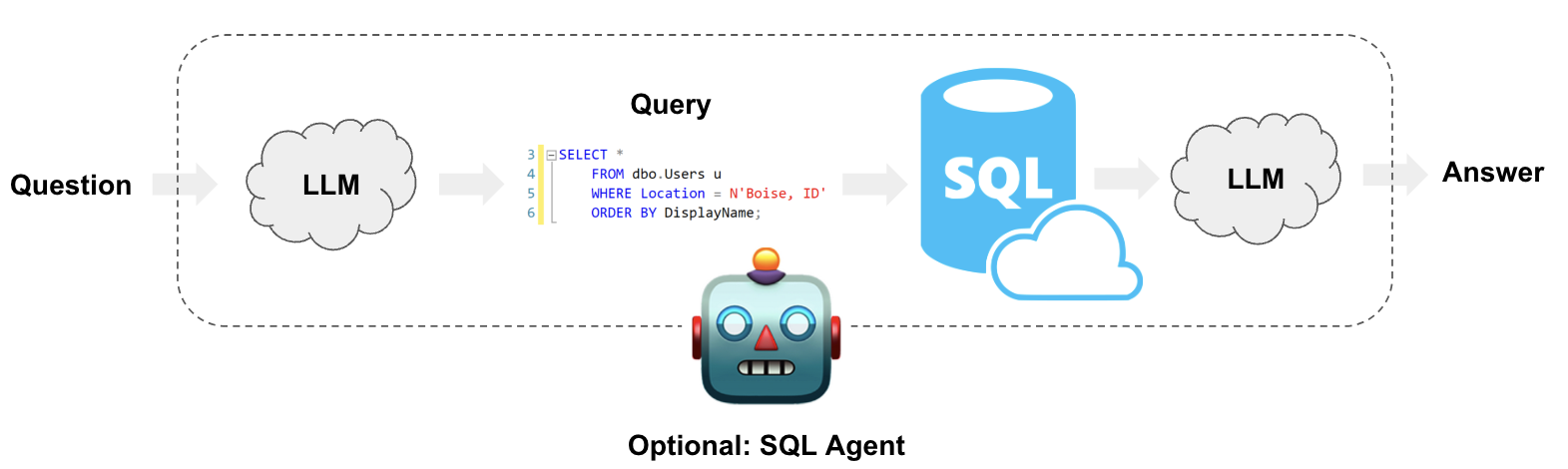
让大型语言模型系统查询结构化数据,与查询非结构化文本数据在本质上是不同的。在后一种情况下,通常会生成可与向量数据库进行搜索的文本;而对于结构化数据,方法通常是让大型语言模型编写并执行某种领域特定语言(DSL)中的查询,例如SQL。在本指南中,我们将介绍在数据库中创建基于表格数据的问答系统的几种基本方法。我们将涵盖使用Chains和代理的实现方式。这些系统将使我们能够以自然语言提问关于数据库中的数据,并获得自然语言的回答。两者之间的主要区别在于,我们的代理可以根据需要多次循环查询数据库,以回答问题。
⚠️ 安全提示 ⚠️
构建基于SQL数据库的问答系统需要执行模型生成的SQL查询。这样做存在固有风险。请确保您的数据库连接权限始终根据链/代理的需求尽可能缩小范围。这将降低但无法完全消除构建模型驱动系统所带来的风险。有关通用安全最佳实践的更多信息,请点击此处。
架构
从高层次来看,这些系统的步骤是:
- 将问题转换为SQL查询: 模型将用户输入转换为SQL查询。
- 执行SQL查询: 执行查询。
- 回答问题: 模型使用查询结果响应用户输入。
请注意,查询CSV文件中的数据可以采用类似的方法。有关更多详细信息,请参阅我们关于在CSV数据上进行问答的操操作指南。
设置
首先,获取所需的包并设置环境变量:
%%capture --no-stderr
%pip install --upgrade --quiet langchain-community langgraph
# Comment out the below to opt-out of using LangSmith in this notebook. Not required.
if not os.environ.get("LANGSMITH_API_KEY"):
    os.environ["LANGSMITH_API_KEY"] = getpass.getpass()
    os.environ["LANGSMITH_TRACING"] = "true"
示例数据
以下示例将使用 SQLite 连接 Chinook 数据库,这是一个代表数字媒体商店的示例数据库。按照 这些安装步骤 在与本笔记本相同的目录中创建 Chinook.db。您也可以通过命令行下载并构建数据库:
curl -s https://raw.githubusercontent.com/lerocha/chinook-database/master/ChinookDatabase/DataSources/Chinook_Sqlite.sql | sqlite3 Chinook.db
现在,Chinook.db 已在我们的目录中,我们可以使用基于 SQLAlchemy 的 SQLDatabase 类与它进行交互:
from langchain_community.utilities import SQLDatabase

db = SQLDatabase.from_uri("sqlite:///Chinook.db")
print(db.dialect)
print(db.get_usable_table_names())
db.run("SELECT * FROM Artist LIMIT 10;")
sqlite
['Album', 'Artist', 'Customer', 'Employee', 'Genre', 'Invoice', 'InvoiceLine', 'MediaType', 'Playlist', 'PlaylistTrack', 'Track']
"[(1, 'AC/DC'), (2, 'Accept'), (3, 'Aerosmith'), (4, 'Alanis Morissette'), (5, 'Alice In Chains'), (6, 'Antônio Carlos Jobim'), (7, 'Apocalyptica'), (8, 'Audioslave'), (9, 'BackBeat'), (10, 'Billy Cobham')]"
太好了!我们有一个可以查询的SQL数据库。现在让我们尝试将其连接到大语言模型。
链式调用
链是可预测步骤的组合。在 LangGraph 中,我们可以通过节点的简单序列来表示一个链。让我们创建一系列步骤,给定一个问题后执行以下操作:
- 将问题转换为SQL查询;
- 执行查询;
- 使用结果来回答原始问题。
这种安排无法支持所有场景。例如,该系统会对任何用户输入执行SQL查询——即使输入是“你好”。重要的是,正如我们将在下面看到的,有些问题需要多次查询才能回答。这些场景将在“代理(Agents)”部分进行处理。
应用状态
我们的应用程序的 LangGraph 状态 控制着输入到应用程序的数据、步骤之间的数据传递以及应用程序的输出。它通常是一个 TypedDict,但也可以是一个 Pydantic BaseModel。
对于此应用,我们只需跟踪输入的问题、生成的查询、查询结果以及生成的答案即可:
from typing_extensions import TypedDict


class State(TypedDict):
    question: str
    query: str
    result: str
    answer: str
现在我们只需要一些作用于该状态并填充其内容的函数。
将问题转换为SQL查询
第一步是获取用户输入并将其转换为SQL查询。为了可靠地获得SQL查询(避免Markdown格式、解释或澄清),我们将使用LangChain的结构化输出抽象功能。
让我们为应用程序选择一个聊天模型:
pip install -qU "langchain[openai]"
import getpass
import os

if not os.environ.get("OPENAI_API_KEY"):
  os.environ["OPENAI_API_KEY"] = getpass.getpass("Enter API key for OpenAI: ")

from langchain.chat_models import init_chat_model

llm = init_chat_model("gpt-4o-mini", model_provider="openai")
让我们为模型提供一些指令:
from langchain_core.prompts import ChatPromptTemplate

system_message = """
Given an input question, create a syntactically correct {dialect} query to
run to help find the answer. Unless the user specifies in his question a
specific number of examples they wish to obtain, always limit your query to
at most {top_k} results. You can order the results by a relevant column to
return the most interesting examples in the database.

Never query for all the columns from a specific table, only ask for a the
few relevant columns given the question.

Pay attention to use only the column names that you can see in the schema
description. Be careful to not query for columns that do not exist. Also,
pay attention to which column is in which table.

Only use the following tables:
{table_info}
"""

user_prompt = "Question: {input}"

query_prompt_template = ChatPromptTemplate(
    [("system", system_message), ("user", user_prompt)]
)

for message in query_prompt_template.messages:
    message.pretty_print()
================================[1m System Message [0m================================
Given an input question, create a syntactically correct [33;1m[1;3m{dialect}[0m query to
run to help find the answer. Unless the user specifies in his question a
specific number of examples they wish to obtain, always limit your query to
at most [33;1m[1;3m{top_k}[0m results. You can order the results by a relevant column to
return the most interesting examples in the database.
Never query for all the columns from a specific table, only ask for a the
few relevant columns given the question.
Pay attention to use only the column names that you can see in the schema
description. Be careful to not query for columns that do not exist. Also,
pay attention to which column is in which table.
Only use the following tables:
[33;1m[1;3m{table_info}[0m
================================[1m Human Message [0m=================================
Question: [33;1m[1;3m{input}[0m
提示包含我们需要填充的多个参数,例如SQL方言和表结构。LangChain的 SQLDatabase 对象包含帮助我们完成此操作的方法。我们的 write_query 步骤将仅填充这些参数,并提示模型生成SQL查询:
from typing_extensions import Annotated


class QueryOutput(TypedDict):
    """Generated SQL query."""

    query: Annotated[str, ..., "Syntactically valid SQL query."]


def write_query(state: State):
    """Generate SQL query to fetch information."""
    prompt = query_prompt_template.invoke(
        {
            "dialect": db.dialect,
            "top_k": 10,
            "table_info": db.get_table_info(),
            "input": state["question"],
        }
    )
    structured_llm = llm.with_structured_output(QueryOutput)
    result = structured_llm.invoke(prompt)
    return {"query": result["query"]}
让我们来试试看:
write_query({"question": "How many Employees are there?"})
{'query': 'SELECT COUNT(*) as employee_count FROM Employee;'}
执行查询
创建SQL链中最危险的部分。 请仔细考虑是否可以对您的数据自动运行查询。尽可能最小化数据库连接权限。在查询执行前,考虑为您的链添加人工审批步骤(见下文)。
要执行查询,我们将从 langchain-community 加载一个工具。我们的 execute_query 节点将仅包装此工具:
from langchain_community.tools.sql_database.tool import QuerySQLDatabaseTool


def execute_query(state: State):
    """Execute SQL query."""
    execute_query_tool = QuerySQLDatabaseTool(db=db)
    return {"result": execute_query_tool.invoke(state["query"])}
测试此步骤:
execute_query({"query": "SELECT COUNT(EmployeeId) AS EmployeeCount FROM Employee;"})
{'result': '[(8,)]'}
生成答案
最后,我们的最后一步是根据从数据库中提取的信息生成对问题的回答:
def generate_answer(state: State):
    """Answer question using retrieved information as context."""
    prompt = (
        "Given the following user question, corresponding SQL query, "
        "and SQL result, answer the user question.\n\n"
        f'Question: {state["question"]}\n'
        f'SQL Query: {state["query"]}\n'
        f'SQL Result: {state["result"]}'
    )
    response = llm.invoke(prompt)
    return {"answer": response.content}
使用 LangGraph 进行编排
最后,我们将应用程序编译为一个单一的 graph 对象。在此情况下,我们只是将三个步骤连接成一个单一的序列。
from langgraph.graph import START, StateGraph

graph_builder = StateGraph(State).add_sequence(
    [write_query, execute_query, generate_answer]
)
graph_builder.add_edge(START, "write_query")
graph = graph_builder.compile()
LangGraph 还提供了内置工具,用于可视化应用程序的控制流程:
from IPython.display import Image, display

display(Image(graph.get_graph().draw_mermaid_png()))

让我们测试一下我们的应用程序!请注意,我们可以流式传输各个步骤的结果:
for step in graph.stream(
    {"question": "How many employees are there?"}, stream_mode="updates"
):
    print(step)
{'write_query': {'query': 'SELECT COUNT(*) as employee_count FROM Employee;'}}
{'execute_query': {'result': '[(8,)]'}}
{'generate_answer': {'answer': 'There are 8 employees in total.'}}
查看 LangSmith 追踪。
Human-in-the-loop
LangGraph 支持多种对工作流程有用的特性。其中之一是 人机协同:我们可以在敏感步骤(例如执行 SQL 查询)之前中断应用程序,以便进行人工审查。这通过 LangGraph 的 持久化 层实现,该层将运行进度保存到您选择的存储中。以下我们指定使用内存存储:
from langgraph.checkpoint.memory import MemorySaver

memory = MemorySaver()
graph = graph_builder.compile(checkpointer=memory, interrupt_before=["execute_query"])

# Now that we're using persistence, we need to specify a thread ID
# so that we can continue the run after review.
config = {"configurable": {"thread_id": "1"}}
display(Image(graph.get_graph().draw_mermaid_png()))

让我们重复相同的运行,加入一个简单的是/否审批步骤:
for step in graph.stream(
    {"question": "How many employees are there?"},
    config,
    stream_mode="updates",
):
    print(step)

try:
    user_approval = input("Do you want to go to execute query? (yes/no): ")
except Exception:
    user_approval = "no"

if user_approval.lower() == "yes":
    # If approved, continue the graph execution
    for step in graph.stream(None, config, stream_mode="updates"):
        print(step)
else:
    print("Operation cancelled by user.")
{'write_query': {'query': 'SELECT COUNT(EmployeeId) AS EmployeeCount FROM Employee;'}}
{'__interrupt__': ()}
``````output
Do you want to go to execute query? (yes/no):  yes
``````output
{'execute_query': {'result': '[(8,)]'}}
{'generate_answer': {'answer': 'There are 8 employees.'}}
查看 此 LangGraph 指南以获取更多详细信息和示例。
下一步
对于更复杂的查询生成,我们可能需要创建少样本提示或添加查询检查步骤。如需了解此类高级技术及其他更多内容,请参阅:
代理
代理 利用大型语言模型的推理能力,在执行过程中做出决策。使用代理可以让您将查询生成和执行过程中的额外自主权交由系统处理。尽管它们的行为不如上述“链”那样可预测,但具有以下优势:
- 它们可以根据需要多次查询数据库来回答用户的问题。
- 它们可以通过运行生成的查询,捕获回溯信息并正确地重新生成查询来从错误中恢复。
- 它们可以根据数据库的模式以及数据库的内容(例如描述特定表)来回答问题。
下面我们构建一个最小的SQL代理。我们将使用LangChain的SQLDatabaseToolkit为其配备一组工具。通过使用LangGraph的预构建ReAct代理构造器,我们只需一行代码即可完成。
查看 LangGraph 的 SQL Agent 教程,了解更高级的 SQL Agent 实现方式。
SQLDatabaseToolkit 包含以下工具:
- 创建并执行查询
- 检查查询语法
- 获取表格描述
- ……以及更多
from langchain_community.agent_toolkits import SQLDatabaseToolkit

toolkit = SQLDatabaseToolkit(db=db, llm=llm)

tools = toolkit.get_tools()

tools
[QuerySQLDatabaseTool(description="Input to this tool is a detailed and correct SQL query, output is a result from the database. If the query is not correct, an error message will be returned. If an error is returned, rewrite the query, check the query, and try again. If you encounter an issue with Unknown column 'xxxx' in 'field list', use sql_db_schema to query the correct table fields.", db=<langchain_community.utilities.sql_database.SQLDatabase object at 0x10d5f9120>),
 InfoSQLDatabaseTool(description='Input to this tool is a comma-separated list of tables, output is the schema and sample rows for those tables. Be sure that the tables actually exist by calling sql_db_list_tables first! Example Input: table1, table2, table3', db=<langchain_community.utilities.sql_database.SQLDatabase object at 0x10d5f9120>),
 ListSQLDatabaseTool(db=<langchain_community.utilities.sql_database.SQLDatabase object at 0x10d5f9120>),
 QuerySQLCheckerTool(description='Use this tool to double check if your query is correct before executing it. Always use this tool before executing a query with sql_db_query!', db=<langchain_community.utilities.sql_database.SQLDatabase object at 0x10d5f9120>, llm=ChatOpenAI(client=<openai.resources.chat.completions.Completions object at 0x119315480>, async_client=<openai.resources.chat.completions.AsyncCompletions object at 0x119317550>, root_client=<openai.OpenAI object at 0x10d5f8df0>, root_async_client=<openai.AsyncOpenAI object at 0x1193154e0>, model_name='gpt-4o', temperature=0.0, model_kwargs={}, openai_api_key=SecretStr('**********')), llm_chain=LLMChain(verbose=False, prompt=PromptTemplate(input_variables=['dialect', 'query'], input_types={}, partial_variables={}, template='\n{query}\nDouble check the {dialect} query above for common mistakes, including:\n- Using NOT IN with NULL values\n- Using UNION when UNION ALL should have been used\n- Using BETWEEN for exclusive ranges\n- Data type mismatch in predicates\n- Properly quoting identifiers\n- Using the correct number of arguments for functions\n- Casting to the correct data type\n- Using the proper columns for joins\n\nIf there are any of the above mistakes, rewrite the query. If there are no mistakes, just reproduce the original query.\n\nOutput the final SQL query only.\n\nSQL Query: '), llm=ChatOpenAI(client=<openai.resources.chat.completions.Completions object at 0x119315480>, async_client=<openai.resources.chat.completions.AsyncCompletions object at 0x119317550>, root_client=<openai.OpenAI object at 0x10d5f8df0>, root_async_client=<openai.AsyncOpenAI object at 0x1193154e0>, model_name='gpt-4o', temperature=0.0, model_kwargs={}, openai_api_key=SecretStr('**********')), output_parser=StrOutputParser(), llm_kwargs={}))]
系统提示
我们还希望为代理加载一个系统提示。这将包含关于如何行为的指示。请注意,下面的提示包含多个参数,我们将在下方进行赋值。
system_message = """
You are an agent designed to interact with a SQL database.
Given an input question, create a syntactically correct {dialect} query to run,
then look at the results of the query and return the answer. Unless the user
specifies a specific number of examples they wish to obtain, always limit your
query to at most {top_k} results.

You can order the results by a relevant column to return the most interesting
examples in the database. Never query for all the columns from a specific table,
only ask for the relevant columns given the question.

You MUST double check your query before executing it. If you get an error while
executing a query, rewrite the query and try again.

DO NOT make any DML statements (INSERT, UPDATE, DELETE, DROP etc.) to the
database.

To start you should ALWAYS look at the tables in the database to see what you
can query. Do NOT skip this step.

Then you should query the schema of the most relevant tables.
""".format(
    dialect="SQLite",
    top_k=5,
)
初始化代理
我们将使用一个预构建的 LangGraph 代理来构建我们的代理
from langchain_core.messages import HumanMessage
from langgraph.prebuilt import create_react_agent

agent_executor = create_react_agent(llm, tools, prompt=system_message)
考虑一下该智能体如何回应以下问题:
question = "Which country's customers spent the most?"

for step in agent_executor.stream(
    {"messages": [{"role": "user", "content": question}]},
    stream_mode="values",
):
    step["messages"][-1].pretty_print()
================================[1m Human Message [0m=================================
Which country's customers spent the most?
==================================[1m Ai Message [0m==================================
Tool Calls:
sql_db_list_tables (call_tFp7HYD6sAAmCShgeqkVZH6Q)
Call ID: call_tFp7HYD6sAAmCShgeqkVZH6Q
Args:
=================================[1m Tool Message [0m=================================
Name: sql_db_list_tables
Album, Artist, Customer, Employee, Genre, Invoice, InvoiceLine, MediaType, Playlist, PlaylistTrack, Track
==================================[1m Ai Message [0m==================================
Tool Calls:
sql_db_schema (call_KJZ1Jx6JazyDdJa0uH1UeiOz)
Call ID: call_KJZ1Jx6JazyDdJa0uH1UeiOz
Args:
table_names: Customer, Invoice
=================================[1m Tool Message [0m=================================
Name: sql_db_schema
CREATE TABLE "Customer" (
"CustomerId" INTEGER NOT NULL,
"FirstName" NVARCHAR(40) NOT NULL,
"LastName" NVARCHAR(20) NOT NULL,
"Company" NVARCHAR(80),
"Address" NVARCHAR(70),
"City" NVARCHAR(40),
"State" NVARCHAR(40),
"Country" NVARCHAR(40),
"PostalCode" NVARCHAR(10),
"Phone" NVARCHAR(24),
"Fax" NVARCHAR(24),
"Email" NVARCHAR(60) NOT NULL,
"SupportRepId" INTEGER,
PRIMARY KEY ("CustomerId"),
FOREIGN KEY("SupportRepId") REFERENCES "Employee" ("EmployeeId")
)
/*
3 rows from Customer table:
CustomerId FirstName LastName Company Address City State Country PostalCode Phone Fax Email SupportRepId
1 Luís Gonçalves Embraer - Empresa Brasileira de Aeronáutica S.A. Av. Brigadeiro Faria Lima, 2170 São José dos Campos SP Brazil 12227-000 +55 (12) 3923-5555 +55 (12) 3923-5566 luisg@embraer.com.br 3
2 Leonie Köhler None Theodor-Heuss-Straße 34 Stuttgart None Germany 70174 +49 0711 2842222 None leonekohler@surfeu.de 5
3 François Tremblay None 1498 rue Bélanger Montréal QC Canada H2G 1A7 +1 (514) 721-4711 None ftremblay@gmail.com 3
*/
CREATE TABLE "Invoice" (
"InvoiceId" INTEGER NOT NULL,
"CustomerId" INTEGER NOT NULL,
"InvoiceDate" DATETIME NOT NULL,
"BillingAddress" NVARCHAR(70),
"BillingCity" NVARCHAR(40),
"BillingState" NVARCHAR(40),
"BillingCountry" NVARCHAR(40),
"BillingPostalCode" NVARCHAR(10),
"Total" NUMERIC(10, 2) NOT NULL,
PRIMARY KEY ("InvoiceId"),
FOREIGN KEY("CustomerId") REFERENCES "Customer" ("CustomerId")
)
/*
3 rows from Invoice table:
InvoiceId CustomerId InvoiceDate BillingAddress BillingCity BillingState BillingCountry BillingPostalCode Total
1 2 2021-01-01 00:00:00 Theodor-Heuss-Straße 34 Stuttgart None Germany 70174 1.98
2 4 2021-01-02 00:00:00 Ullevålsveien 14 Oslo None Norway 0171 3.96
3 8 2021-01-03 00:00:00 Grétrystraat 63 Brussels None Belgium 1000 5.94
*/
==================================[1m Ai Message [0m==================================
Tool Calls:
sql_db_query_checker (call_AQuTGbgH63u4gPgyV723yrjX)
Call ID: call_AQuTGbgH63u4gPgyV723yrjX
Args:
query: SELECT c.Country, SUM(i.Total) as TotalSpent FROM Customer c JOIN Invoice i ON c.CustomerId = i.CustomerId GROUP BY c.Country ORDER BY TotalSpent DESC LIMIT 1;
=================================[1m Tool Message [0m=================================
Name: sql_db_query_checker
\`\`\`sql
SELECT c.Country, SUM(i.Total) as TotalSpent FROM Customer c JOIN Invoice i ON c.CustomerId = i.CustomerId GROUP BY c.Country ORDER BY TotalSpent DESC LIMIT 1;
\`\`\`
==================================[1m Ai Message [0m==================================
Tool Calls:
sql_db_query (call_B88EwU44nwwpQL5M9nlcemSU)
Call ID: call_B88EwU44nwwpQL5M9nlcemSU
Args:
query: SELECT c.Country, SUM(i.Total) as TotalSpent FROM Customer c JOIN Invoice i ON c.CustomerId = i.CustomerId GROUP BY c.Country ORDER BY TotalSpent DESC LIMIT 1;
=================================[1m Tool Message [0m=================================
Name: sql_db_query
[('USA', 523.06)]
==================================[1m Ai Message [0m==================================
The country whose customers spent the most is the USA, with a total spending of 523.06.
您还可以使用 LangSmith 跟踪 来可视化这些步骤及相关元数据。
请注意,该代理会执行多次查询,直到获得所需信息为止:
- 列出可用的表;
- 获取三个表的模式;
- 通过连接操作查询多个表。
然后,该代理能够使用最终查询的结果来生成对原始问题的回答。
该代理同样可以处理定性问题:
question = "Describe the playlisttrack table"

for step in agent_executor.stream(
    {"messages": [{"role": "user", "content": question}]},
    stream_mode="values",
):
    step["messages"][-1].pretty_print()
================================[1m Human Message [0m=================================
Describe the playlisttrack table
==================================[1m Ai Message [0m==================================
Tool Calls:
sql_db_list_tables (call_fMF8eTmX5TJDJjc3Mhdg52TI)
Call ID: call_fMF8eTmX5TJDJjc3Mhdg52TI
Args:
=================================[1m Tool Message [0m=================================
Name: sql_db_list_tables
Album, Artist, Customer, Employee, Genre, Invoice, InvoiceLine, MediaType, Playlist, PlaylistTrack, Track
==================================[1m Ai Message [0m==================================
Tool Calls:
sql_db_schema (call_W8Vkk4NEodkAAIg8nexAszUH)
Call ID: call_W8Vkk4NEodkAAIg8nexAszUH
Args:
table_names: PlaylistTrack
=================================[1m Tool Message [0m=================================
Name: sql_db_schema
CREATE TABLE "PlaylistTrack" (
"PlaylistId" INTEGER NOT NULL,
"TrackId" INTEGER NOT NULL,
PRIMARY KEY ("PlaylistId", "TrackId"),
FOREIGN KEY("TrackId") REFERENCES "Track" ("TrackId"),
FOREIGN KEY("PlaylistId") REFERENCES "Playlist" ("PlaylistId")
)
/*
3 rows from PlaylistTrack table:
PlaylistId TrackId
1 3402
1 3389
1 3390
*/
==================================[1m Ai Message [0m==================================
The `PlaylistTrack` table is designed to associate tracks with playlists. It has the following structure:
- **PlaylistId**: An integer that serves as a foreign key referencing the `Playlist` table. It is part of the composite primary key.
- **TrackId**: An integer that serves as a foreign key referencing the `Track` table. It is also part of the composite primary key.
The primary key for this table is a composite key consisting of both `PlaylistId` and `TrackId`, ensuring that each track can be uniquely associated with a playlist. The table enforces referential integrity by linking to the `Track` and `Playlist` tables through foreign keys.
处理高基数列
为了筛选包含专有名词(如地址、歌曲名称或艺术家)的列,我们首先需要仔细核对拼写,以确保正确地过滤数据。
我们可以通过创建一个向量存储来实现这一点,该存储包含数据库中所有不同的专有名词。每当用户在其问题中提及专有名词时,代理便可查询该向量存储,以找到该词汇的正确拼写。通过这种方式,代理能够在构建目标查询之前,确保理解用户所指的具体实体。
首先,我们需要获取每个我们想要的实体的唯一值,为此我们定义一个函数,将结果解析为元素列表:
import ast
import re


def query_as_list(db, query):
    res = db.run(query)
    res = [el for sub in ast.literal_eval(res) for el in sub if el]
    res = [re.sub(r"\b\d+\b", "", string).strip() for string in res]
    return list(set(res))


artists = query_as_list(db, "SELECT Name FROM Artist")
albums = query_as_list(db, "SELECT Title FROM Album")
albums[:5]
['In Through The Out Door',
 'Transmission',
 'Battlestar Galactica (Classic), Season',
 'A Copland Celebration, Vol. I',
 'Quiet Songs']
使用此函数,我们可以创建一个检索工具,该工具可由代理自主执行。
选择一个嵌入模型:
pip install -qU langchain-openai
import getpass
import os

if not os.environ.get("OPENAI_API_KEY"):
  os.environ["OPENAI_API_KEY"] = getpass.getpass("Enter API key for OpenAI: ")

from langchain_openai import OpenAIEmbeddings

embeddings = OpenAIEmbeddings(model="text-embedding-3-large")
选择一个向量存储:
pip install -qU langchain-core
from langchain_core.vectorstores import InMemoryVectorStore

vector_store = InMemoryVectorStore(embeddings)
现在我们可以构建一个检索工具,该工具可以在数据库中搜索相关的专有名词:
from langchain.agents.agent_toolkits import create_retriever_tool

_ = vector_store.add_texts(artists + albums)
retriever = vector_store.as_retriever(search_kwargs={"k": 5})
description = (
    "Use to look up values to filter on. Input is an approximate spelling "
    "of the proper noun, output is valid proper nouns. Use the noun most "
    "similar to the search."
)
retriever_tool = create_retriever_tool(
    retriever,
    name="search_proper_nouns",
    description=description,
)
让我们试一试:
print(retriever_tool.invoke("Alice Chains"))
Alice In Chains

Alanis Morissette

Pearl Jam

Pearl Jam

Audioslave
这样,如果代理判断需要根据艺术家“Alice Chains”这类信息编写过滤条件,它可以先使用检索工具来观察某一列的相关值。
综上所述:
# Add to system message
suffix = (
    "If you need to filter on a proper noun like a Name, you must ALWAYS first look up "
    "the filter value using the 'search_proper_nouns' tool! Do not try to "
    "guess at the proper name - use this function to find similar ones."
)

system = f"{system_message}\n\n{suffix}"

tools.append(retriever_tool)

agent = create_react_agent(llm, tools, prompt=system)
question = "How many albums does alis in chain have?"

for step in agent.stream(
    {"messages": [{"role": "user", "content": question}]},
    stream_mode="values",
):
    step["messages"][-1].pretty_print()
================================[1m Human Message [0m=================================
How many albums does alis in chain have?
==================================[1m Ai Message [0m==================================
Tool Calls:
search_proper_nouns (call_8ryjsRPLAr79mM3Qvnq6gTOH)
Call ID: call_8ryjsRPLAr79mM3Qvnq6gTOH
Args:
query: alis in chain
=================================[1m Tool Message [0m=================================
Name: search_proper_nouns
Alice In Chains
Aisha Duo
Xis
Da Lama Ao Caos
A-Sides
==================================[1m Ai Message [0m==================================
Tool Calls:
sql_db_list_tables (call_NJjtCpU89MBMplssjn1z0xzq)
Call ID: call_NJjtCpU89MBMplssjn1z0xzq
Args:
search_proper_nouns (call_1BfrueC9koSIyi4OfMu2Ao8q)
Call ID: call_1BfrueC9koSIyi4OfMu2Ao8q
Args:
query: Alice In Chains
=================================[1m Tool Message [0m=================================
Name: search_proper_nouns
Alice In Chains
Pearl Jam
Pearl Jam
Foo Fighters
Soundgarden
==================================[1m Ai Message [0m==================================
Tool Calls:
sql_db_schema (call_Kn09w9jd9swcNzIZ1b5MlKID)
Call ID: call_Kn09w9jd9swcNzIZ1b5MlKID
Args:
table_names: Album, Artist
=================================[1m Tool Message [0m=================================
Name: sql_db_schema
CREATE TABLE "Album" (
"AlbumId" INTEGER NOT NULL,
"Title" NVARCHAR(160) NOT NULL,
"ArtistId" INTEGER NOT NULL,
PRIMARY KEY ("AlbumId"),
FOREIGN KEY("ArtistId") REFERENCES "Artist" ("ArtistId")
)
/*
3 rows from Album table:
AlbumId Title ArtistId
1 For Those About To Rock We Salute You 1
2 Balls to the Wall 2
3 Restless and Wild 2
*/
CREATE TABLE "Artist" (
"ArtistId" INTEGER NOT NULL,
"Name" NVARCHAR(120),
PRIMARY KEY ("ArtistId")
)
/*
3 rows from Artist table:
ArtistId Name
1 AC/DC
2 Accept
3 Aerosmith
*/
==================================[1m Ai Message [0m==================================
Tool Calls:
sql_db_query (call_WkHRiPcBoGN9bc58MIupRHKP)
Call ID: call_WkHRiPcBoGN9bc58MIupRHKP
Args:
query: SELECT COUNT(*) FROM Album WHERE ArtistId = (SELECT ArtistId FROM Artist WHERE Name = 'Alice In Chains')
=================================[1m Tool Message [0m=================================
Name: sql_db_query
[(1,)]
==================================[1m Ai Message [0m==================================
Alice In Chains has released 1 album in the database.
如我们所见,在流式步骤和LangSmith 跟踪中,该代理使用了search_proper_nouns工具,以确认如何正确查询此特定艺术家的数据库。