

如何在图数据库上添加语义层
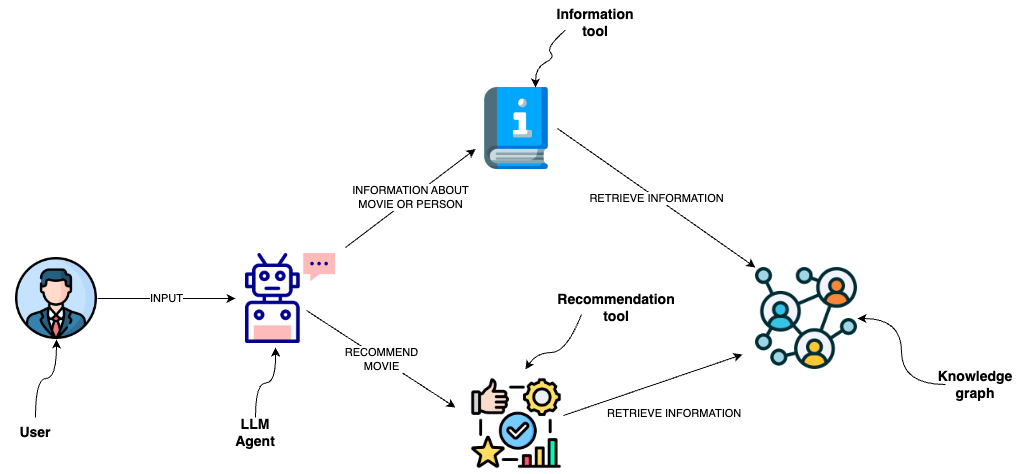
您可以使用数据库查询从图数据库(如 Neo4j)中检索信息。 一种方法是使用大语言模型(LLMs)生成 Cypher 语句。 虽然这种方法具有出色的灵活性,但解决方案可能较为脆弱,无法持续生成精确的 Cypher 语句。 与其直接生成 Cypher 语句,不如在语义层中实现 Cypher 模板作为工具,供大语言模型代理调用。
设置
首先,获取所需的包并设置环境变量:
%pip install --upgrade --quiet langchain langchain-neo4j langchain-openai
本指南默认使用 OpenAI 模型,但您可以将其替换为您选择的其他模型提供商。
import getpass
import os

os.environ["OPENAI_API_KEY"] = getpass.getpass()

# Uncomment the below to use LangSmith. Not required.
# os.environ["LANGSMITH_API_KEY"] = getpass.getpass()
# os.environ["LANGSMITH_TRACING"] = "true"
········
接下来,我们需要定义 Neo4j 凭据。 按照 这些安装步骤 来设置 Neo4j 数据库。
os.environ["NEO4J_URI"] = "bolt://localhost:7687"
os.environ["NEO4J_USERNAME"] = "neo4j"
os.environ["NEO4J_PASSWORD"] = "password"
以下示例将创建与 Neo4j 数据库的连接,并填充有关电影及其演员的示例数据。
from langchain_neo4j import Neo4jGraph

graph = Neo4jGraph(refresh_schema=False)

# Import movie information

movies_query = """
LOAD CSV WITH HEADERS FROM
'https://raw.githubusercontent.com/tomasonjo/blog-datasets/main/movies/movies_small.csv'
AS row
MERGE (m:Movie {id:row.movieId})
SET m.released = date(row.released),
    m.title = row.title,
    m.imdbRating = toFloat(row.imdbRating)
FOREACH (director in split(row.director, '|') |
    MERGE (p:Person {name:trim(director)})
    MERGE (p)-[:DIRECTED]->(m))
FOREACH (actor in split(row.actors, '|') |
    MERGE (p:Person {name:trim(actor)})
    MERGE (p)-[:ACTED_IN]->(m))
FOREACH (genre in split(row.genres, '|') |
    MERGE (g:Genre {name:trim(genre)})
    MERGE (m)-[:IN_GENRE]->(g))
"""

graph.query(movies_query)
[]
使用 Cypher 模板的自定义工具
语义层由各种工具组成,这些工具向大型语言模型(LLM)开放,使其能够与知识图谱进行交互。 这些工具的复杂程度各不相同。你可以将语义层中的每个工具视为一个函数。
我们将实现的功能是检索有关电影或其演员的信息。
description_query = """
MATCH (m:Movie|Person)
WHERE m.title CONTAINS $candidate OR m.name CONTAINS $candidate
MATCH (m)-[r:ACTED_IN|IN_GENRE]-(t)
WITH m, type(r) as type, collect(coalesce(t.name, t.title)) as names
WITH m, type+": "+reduce(s="", n IN names | s + n + ", ") as types
WITH m, collect(types) as contexts
WITH m, "type:" + labels(m)[0] + "\ntitle: "+ coalesce(m.title, m.name)
       + "\nyear: "+coalesce(m.released,"") +"\n" +
       reduce(s="", c in contexts | s + substring(c, 0, size(c)-2) +"\n") as context
RETURN context LIMIT 1
"""


def get_information(entity: str) -> str:
    try:
        data = graph.query(description_query, params={"candidate": entity})
        return data[0]["context"]
    except IndexError:
        return "No information was found"
你可以观察到,我们已经定义了用于检索信息的 Cypher 语句。 因此,我们可以避免生成 Cypher 语句,仅使用 LLM 代理来填充输入参数。 为了向 LLM 代理提供有关何时使用工具及其输入参数的额外信息,我们将该函数包装为一个工具。
from typing import Optional, Type

from langchain_core.tools import BaseTool
from pydantic import BaseModel, Field


class InformationInput(BaseModel):
    entity: str = Field(description="movie or a person mentioned in the question")


class InformationTool(BaseTool):
    name: str = "Information"
    description: str = (
        "useful for when you need to answer questions about various actors or movies"
    )
    args_schema: Type[BaseModel] = InformationInput

    def _run(
        self,
        entity: str,
    ) -> str:
        """Use the tool."""
        return get_information(entity)

    async def _arun(
        self,
        entity: str,
    ) -> str:
        """Use the tool asynchronously."""
        return get_information(entity)
LangGraph Agent
我们将使用 LangGraph 实现一个简单的 ReAct 代理。
该代理由一个大语言模型(LLM)和工具步骤组成。当我们与代理交互时,首先会调用大语言模型来判断是否需要使用工具。随后我们将进入一个循环:
如果代理建议采取某个行动(即调用工具),我们将执行这些工具,并将结果返回给代理。 如果代理未要求运行工具,我们将结束(回复用户)。
代码实现简单明了。首先,我们将工具绑定到LLM,并定义助手步骤。
from langchain_core.messages import HumanMessage, SystemMessage
from langchain_openai import ChatOpenAI
from langgraph.graph import MessagesState

llm = ChatOpenAI(model="gpt-4o")

tools = [InformationTool()]
llm_with_tools = llm.bind_tools(tools)

# System message
sys_msg = SystemMessage(
    content="You are a helpful assistant tasked with finding and explaining relevant information about movies."
)


# Node
def assistant(state: MessagesState):
    return {"messages": [llm_with_tools.invoke([sys_msg] + state["messages"])]}
接下来我们定义 LangGraph 流。
from IPython.display import Image, display
from langgraph.graph import END, START, StateGraph
from langgraph.prebuilt import ToolNode, tools_condition

# Graph
builder = StateGraph(MessagesState)

# Define nodes: these do the work
builder.add_node("assistant", assistant)
builder.add_node("tools", ToolNode(tools))

# Define edges: these determine how the control flow moves
builder.add_edge(START, "assistant")
builder.add_conditional_edges(
    "assistant",
    # If the latest message (result) from assistant is a tool call -> tools_condition routes to tools
    # If the latest message (result) from assistant is a not a tool call -> tools_condition routes to END
    tools_condition,
)
builder.add_edge("tools", "assistant")
react_graph = builder.compile()

# Show
display(Image(react_graph.get_graph(xray=True).draw_mermaid_png()))

现在让我们用一个示例问题来测试这个工作流程。
input_messages = [HumanMessage(content="Who played in the Casino?")]
messages = react_graph.invoke({"messages": input_messages})
for m in messages["messages"]:
    m.pretty_print()
================================[1m Human Message [0m=================================
Who played in the Casino?
==================================[1m Ai Message [0m==================================
Tool Calls:
Information (call_j4usgFStGtBM16fuguRaeoGc)
Call ID: call_j4usgFStGtBM16fuguRaeoGc
Args:
entity: Casino
=================================[1m Tool Message [0m=================================
Name: Information
type:Movie
title: Casino
year: 1995-11-22
ACTED_IN: Robert De Niro, Joe Pesci, Sharon Stone, James Woods
IN_GENRE: Drama, Crime
==================================[1m Ai Message [0m==================================
The movie "Casino," released in 1995, features the following actors:
- Robert De Niro
- Joe Pesci
- Sharon Stone
- James Woods
The film is in the Drama and Crime genres.