评估一个复杂的智能体
智能体评估 | 评估器 | 大语言模型作为裁判的评估器
在本教程中,我们将构建一个客户支持聊天机器人,帮助用户浏览数字音乐商店。随后,我们将介绍对聊天机器人执行评估时最有效的三种评估类型:
- 最终响应:评估代理的最终响应。
- 执行轨迹:评估智能体是否遵循了预期的执行路径(例如,工具调用序列)以得出最终答案。
- 单步执行:独立评估任意智能体的单个步骤(例如,判断其是否为给定任务选择了合适的首个工具)。
我们将使用 LangGraph 构建智能体,但此处展示的技术和 LangSmith 功能与框架无关。
设置
配置环境
让我们安装所需的依赖项:
pip install -U langgraph langchain[openai]
让我们为 OpenAI 和 LangSmith 设置环境变量:
import getpass
import os

def _set_env(var: str) -> None:
    if not os.environ.get(var):
        os.environ[var] = getpass.getpass(f"Set {var}: ")

os.environ["LANGSMITH_TRACING"] = "true"
_set_env("LANGSMITH_API_KEY")
_set_env("OPENAI_API_KEY")
下载数据库
本教程将创建一个 SQLite 数据库。SQLite 是一种轻量级数据库,易于设置和使用。
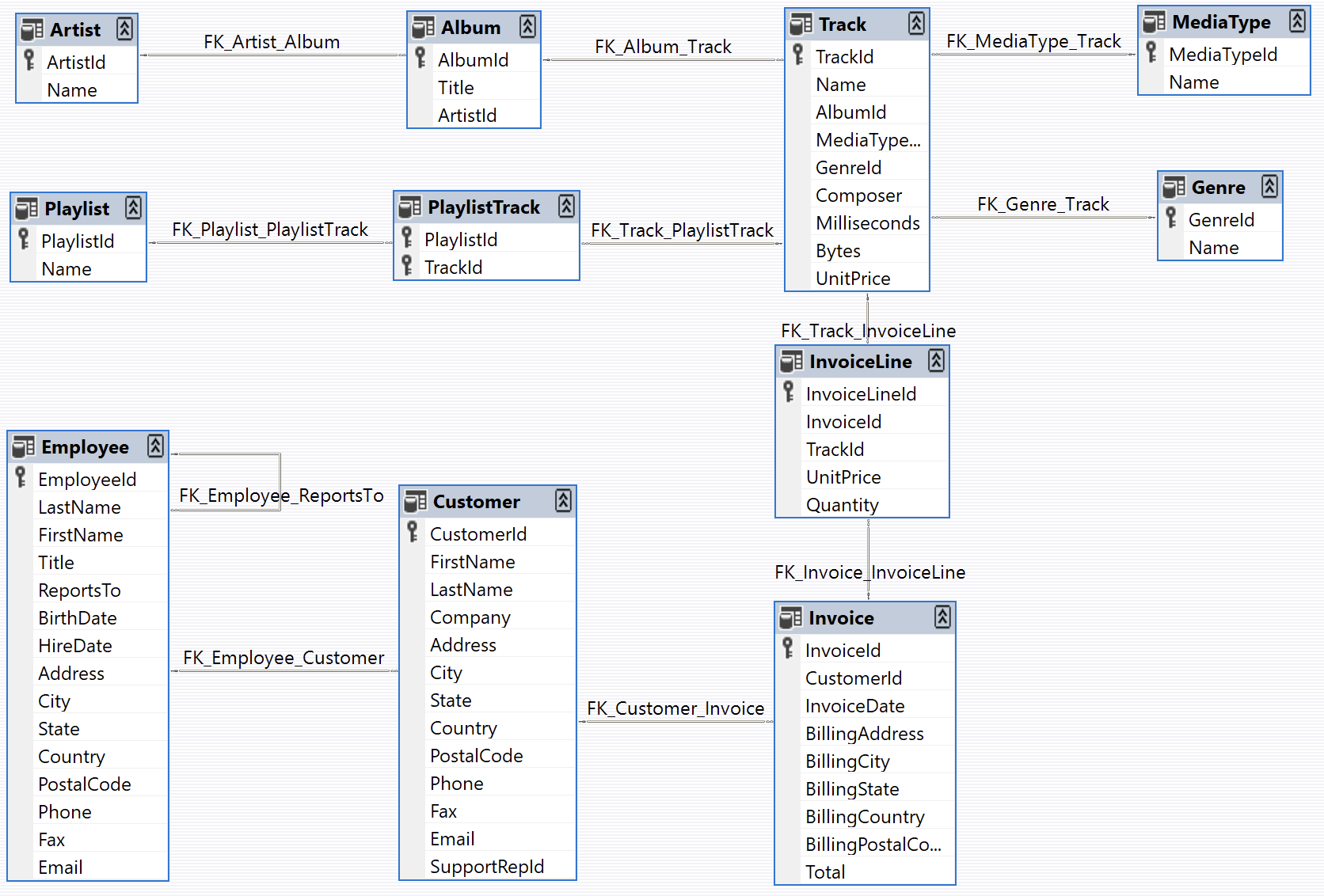
我们将加载 chinook 数据库,这是一个代表数字媒体商店的示例数据库。
有关该数据库的更多信息,请参见 此处。
为方便起见,我们已将数据库托管在公共的 Google Cloud Storage(GCS)存储桶中:
import requests

url = "https://storage.googleapis.com/benchmarks-artifacts/chinook/Chinook.db"

response = requests.get(url)

if response.status_code == 200:
    # Open a local file in binary write mode
    with open("chinook.db", "wb") as file:
        # Write the content of the response (the file) to the local file
        file.write(response.content)
    print("File downloaded and saved as Chinook.db")
else:
    print(f"Failed to download the file. Status code: {response.status_code}")
以下是数据库中数据的示例:
import sqlite3 ...
[(1, 'AC/DC'), (2, 'Accept'), (3, 'Aerosmith'), (4, 'Alanis Morissette'), (5, 'Alice In Chains'), (6, 'Antônio Carlos Jobim'), (7, 'Apocalyptica'), (8, 'Audioslave'), (9, 'BackBeat'), (10, 'Billy Cobham')]
以下是数据库结构图(图片来自 https://github.com/lerocha/chinook-database):
定义客户支持代理
我们将创建一个具有有限数据库访问权限的 LangGraph 智能体。为演示目的,该智能体将支持两种基本类型的请求:
- 查询:客户可以根据其他识别信息查找歌曲名称、艺术家姓名和专辑。例如:“您有哪些吉米·亨德里克斯的歌曲?”
- 退款:客户可以申请退还其过往购买商品的款项。例如:“我叫克劳德·香农,我想退还上周购买的商品,请问您能帮我办理吗?”
为简化本演示,我们将通过删除相应的数据库记录来实现退款功能。我们将跳过用户身份验证及其他生产环境所需的安全措施的实现。
代理的逻辑将被构建成两个独立的子图(一个用于查询,另一个用于退款),并由一个父图负责将请求路由至相应的子图。
退款代理
让我们构建退款处理智能体。该智能体需要:
- 在数据库中查找客户的购买记录
- 删除相关的发票(Invoice)和发票明细(InvoiceLine)记录以处理退款
我们将创建两个SQL辅助函数:
- 通过删除记录来执行退款的函数
- 查询客户购买历史的函数
为了简化测试,我们将在这些函数中添加一种“模拟”模式。启用模拟模式后,这些函数将模拟数据库操作,而不会实际修改任何数据。
import sqlite3

def _refund(invoice_id: int | None, invoice_line_ids: list[int] | None, mock: bool = False) -> float: ...

def _lookup( ...
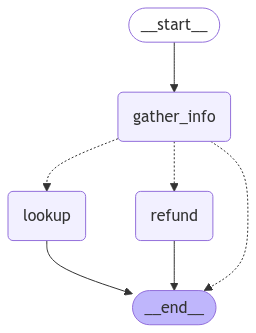
现在,让我们定义图结构。我们将采用一种简单的架构,包含三条主要路径:
- 从对话中提取客户和购买信息
- 将请求路由至以下三条路径之一:
- 退款路径:如果我们拥有足够的采购详情(发票ID或发票行项目ID),即可处理退款。
- 查询路径:如果我们拥有足够的客户信息(姓名和电话),即可搜索其购买历史。
- 响应路径:如果我们需要更多信息,请向用户回复,明确说明所需的具体细节
图的状态将跟踪:
- 对话历史(用户与智能体之间的消息)
- 从对话中提取的所有客户和购买信息
- 要发送给用户的下一条消息(后续文本)
from typing import Literal
import json

from langchain.chat_models import init_chat_model
from langchain_core.runnables import RunnableConfig
from langgraph.graph import END, StateGraph
from langgraph.graph.message import AnyMessage, add_messages
from langgraph.types import Command, interrupt
from tabulate import tabulate
from typing_extensions import Annotated, TypedDict

# Graph state.
class State(TypedDict):
    """Agent state."""
    messages: Annotated[list[AnyMessage], add_messages]
    followup: str | None

    invoice_id: int | None
    invoice_line_ids: list[int] | None
    customer_first_name: str | None
    customer_last_name: str | None
    customer_phone: str | None
    track_name: str | None
    album_title: str | None
    artist_name: str | None
    purchase_date_iso_8601: str | None

# Instructions for extracting the user/purchase info from the conversation.
gather_info_instructions = """You are managing an online music store that sells song tracks. \
Customers can buy multiple tracks at a time and these purchases are recorded in a database as \
an Invoice per purchase and an associated set of Invoice Lines for each purchased track.

Your task is to help customers who would like a refund for one or more of the tracks they've \
purchased. In order for you to be able refund them, the customer must specify the Invoice ID \
to get a refund on all the tracks they bought in a single transaction, or one or more Invoice \
Line IDs if they would like refunds on individual tracks.

Often a user will not know the specific Invoice ID(s) or Invoice Line ID(s) for which they \
would like a refund. In this case you can help them look up their invoices by asking them to \
specify:
- Required: Their first name, last name, and phone number.
- Optionally: The track name, artist name, album name, or purchase date.

If the customer has not specified the required information (either Invoice/Invoice Line IDs \
or first name, last name, phone) then please ask them to specify it."""

# Extraction schema, mirrors the graph state.
class PurchaseInformation(TypedDict):
    """All of the known information about the invoice / invoice lines the customer would like refunded. Do not make up values, leave fields as null if you don't know their value."""

    invoice_id: int | None
    invoice_line_ids: list[int] | None
    customer_first_name: str | None
    customer_last_name: str | None
    customer_phone: str | None
    track_name: str | None
    album_title: str | None
    artist_name: str | None
    purchase_date_iso_8601: str | None
    followup: Annotated[
        str | None,
        ...,
        "If the user hasn't enough identifying information, please tell them what the required information is and ask them to specify it.",
    ]

# Model for performing extraction.
info_llm = init_chat_model("gpt-4o-mini").with_structured_output(
    PurchaseInformation, method="json_schema", include_raw=True
)

# Graph node for extracting user info and routing to lookup/refund/END.
async def gather_info(state: State) -> Command[Literal["lookup", "refund", END]]:
    info = await info_llm.ainvoke(
        [
            {"role": "system", "content": gather_info_instructions},
            *state["messages"],
        ]
    )
    parsed = info["parsed"]
    if any(parsed[k] for k in ("invoice_id", "invoice_line_ids")):
        goto = "refund"
    elif all(
        parsed[k]
        for k in ("customer_first_name", "customer_last_name", "customer_phone")
    ):
        goto = "lookup"
    else:
        goto = END
    update = {"messages": [info["raw"]], **parsed}
    return Command(update=update, goto=goto)

# Graph node for executing the refund.
# Note that here we inspect the runtime config for an "env" variable.
# If "env" is set to "test", then we don't actually delete any rows from our database.
# This will become important when we're running our evaluations.
def refund(state: State, config: RunnableConfig) -> dict:
    # Whether to mock the deletion. True if the configurable var 'env' is set to 'test'.
    mock = config.get("configurable", {}).get("env", "prod") == "test"
    refunded = _refund(
        invoice_id=state["invoice_id"], invoice_line_ids=state["invoice_line_ids"], mock=mock
    )
    response = f"You have been refunded a total of: ${refunded:.2f}. Is there anything else I can help with?"
    return {
        "messages": [{"role": "assistant", "content": response}],
        "followup": response,
    }

# Graph node for looking up the users purchases
def lookup(state: State) -> dict:
    args = (
        state[k]
        for k in (
            "customer_first_name",
            "customer_last_name",
            "customer_phone",
            "track_name",
            "album_title",
            "artist_name",
            "purchase_date_iso_8601",
        )
    )
    results = _lookup(*args)
    if not results:
        response = "We did not find any purchases associated with the information you've provided. Are you sure you've entered all of your information correctly?"
        followup = response
    else:
        response = f"Which of the following purchases would you like to be refunded for?\n\n```json{json.dumps(results, indent=2)}\n```"
        followup = f"Which of the following purchases would you like to be refunded for?\n\n{tabulate(results, headers='keys')}"
    return {
        "messages": [{"role": "assistant", "content": response}],
        "followup": followup,
        "invoice_line_ids": [res["invoice_line_id"] for res in results],
    }

# Building our graph
graph_builder = StateGraph(State)

graph_builder.add_node(gather_info)
graph_builder.add_node(refund)
graph_builder.add_node(lookup)

graph_builder.set_entry_point("gather_info")
graph_builder.add_edge("lookup", END)
graph_builder.add_edge("refund", END)

refund_graph = graph_builder.compile()
我们可以可视化我们的退款流程图:
# Assumes you're in an interactive Python environment
from IPython.display import Image, display ...
查找代理
对于检索型(即问答型)智能体,我们将采用一种简单的 ReACT 架构,并为该智能体提供若干工具,用于根据各种筛选条件查询曲目名称、艺术家名称和专辑名称。例如,您可以按特定艺术家查询其发行的专辑,或查询发布过某首特定名称歌曲的艺术家等。
from langchain.embeddings import init_embeddings
from langchain_core.tools import tool
from langchain_core.vectorstores import InMemoryVectorStore
from langgraph.prebuilt import create_react_agent

# Our SQL queries will only work if we filter on the exact string values that are in the DB.
# To ensure this, we'll create vectorstore indexes for all of the artists, tracks and albums
# ahead of time and use those to disambiguate the user input. E.g. if a user searches for
# songs by "prince" and our DB records the artist as "Prince", ideally when we query our
# artist vectorstore for "prince" we'll get back the value "Prince", which we can then
# use in our SQL queries.
def index_fields() -> tuple[InMemoryVectorStore, InMemoryVectorStore, InMemoryVectorStore]: ...

track_store, artist_store, album_store = index_fields()

# Agent tools
@tool
def lookup_track( ...

@tool
def lookup_album( ...

@tool
def lookup_artist( ...

# Agent model
qa_llm = init_chat_model("claude-3-5-sonnet-latest")
# The prebuilt ReACT agent only expects State to have a 'messages' key, so the
# state we defined for the refund agent can also be passed to our lookup agent.
qa_graph = create_react_agent(qa_llm, [lookup_track, lookup_artist, lookup_album])
display(Image(qa_graph.get_graph(xray=True).draw_mermaid_png()))

父代理
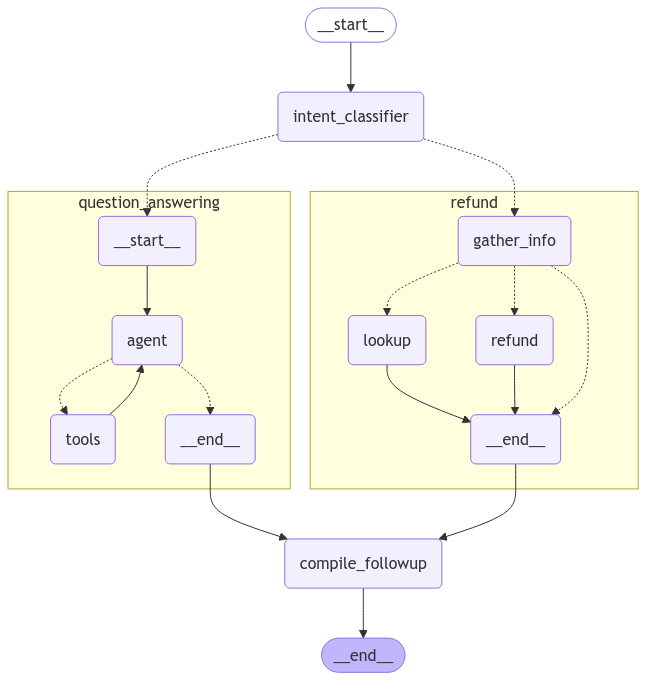
现在,让我们定义一个父代理,用于整合上述两个面向特定任务的代理。 父代理的唯一职责是:根据对用户当前意图的分类,将请求路由至其中一个子代理,并将子代理的输出整合为一条后续消息。
# Schema for routing user intent.
# We'll use structured outputs to enforce that the model returns only
# the desired output.
class UserIntent(TypedDict):
    """The user's current intent in the conversation"""

    intent: Literal["refund", "question_answering"]

# Routing model with structured output
router_llm = init_chat_model("gpt-4o-mini").with_structured_output(
    UserIntent, method="json_schema", strict=True
)

# Instructions for routing.
route_instructions = """You are managing an online music store that sells song tracks. \
You can help customers in two types of ways: (1) answering general questions about \
tracks sold at your store, (2) helping them get a refund on a purhcase they made at your store.

Based on the following conversation, determine if the user is currently seeking general \
information about song tracks or if they are trying to refund a specific purchase.

Return 'refund' if they are trying to get a refund and 'question_answering' if they are \
asking a general music question. Do NOT return anything else. Do NOT try to respond to \
the user.
"""

# Node for routing.
async def intent_classifier(
    state: State,
) -> Command[Literal["refund_agent", "question_answering_agent"]]:
    response = router_llm.invoke(
        [{"role": "system", "content": route_instructions}, *state["messages"]]
    )
    return Command(goto=response["intent"] + "_agent")

# Node for making sure the 'followup' key is set before our agent run completes.
def compile_followup(state: State) -> dict:
    """Set the followup to be the last message if it hasn't explicitly been set."""
    if not state.get("followup"):
        return {"followup": state["messages"][-1].content}
    return {}

# Agent definition
graph_builder = StateGraph(State)
graph_builder.add_node(intent_classifier)
# Since all of our subagents have compatible state,
# we can add them as nodes directly.
graph_builder.add_node("refund_agent", refund_graph)
graph_builder.add_node("question_answering_agent", qa_graph)
graph_builder.add_node(compile_followup)

graph_builder.set_entry_point("intent_classifier")
graph_builder.add_edge("refund_agent", "compile_followup")
graph_builder.add_edge("question_answering_agent", "compile_followup")
graph_builder.add_edge("compile_followup", END)

graph = graph_builder.compile()
我们可以可视化已编译的父图,包括其所有子图:
display(Image(graph.get_graph().draw_mermaid_png()))
立即试用
让我们试用一下我们自定义的支持代理!
state = await graph.ainvoke(
    {"messages": [{"role": "user", "content": "what james brown songs do you have"}]}
)
print(state["followup"])
I found 20 James Brown songs in the database, all from the album "Sex Machine". Here they are: ...
state = await graph.ainvoke({"messages": [
    {
        "role": "user",
        "content": "my name is Aaron Mitchell and my number is +1 (204) 452-6452. I bought some songs by Led Zeppelin that i'd like refunded",
    }
]})
print(state["followup"])
Which of the following purchases would you like to be refunded for? ...
评估
现在我们已经拥有了一个可测试的智能体版本,接下来让我们运行一些评估。 智能体评估至少可以关注以下三个方面:
- 最终响应:输入包括一个提示词和一个可选的工具列表。输出为智能体的最终响应。
- 执行流程:与之前一样,输入为提示词和一个可选的工具列表。输出为工具调用列表。
- 单步执行:与之前一样,输入包括一个提示词和一个可选的工具列表。输出为工具调用。
让我们运行每种类型的评估:
最终响应评估器
首先,让我们创建一个用于评估智能体端到端性能的数据集。 为简化起见,我们将对最终响应和轨迹评估使用同一数据集,因此需为每个示例问题同时添加标准答案(ground-truth)响应和标准轨迹。 轨迹相关内容将在下一节中介绍。
from langsmith import Client

client = Client()

# Create a dataset
examples = [
    {
        "inputs": {
            "question": "How many songs do you have by James Brown",
        },
        "outputs": {
            "response": "We have 20 songs by James Brown",
            "trajectory": ["question_answering_agent", "lookup_track"]
        }
    },
    {
        "inputs": {
            "question": "My name is Aaron Mitchell and I'd like a refund.",
        },
        "outputs": {
            "response": "I need some more information to help you with the refund. Please specify your phone number, the invoice ID, or the line item IDs for the purchase you'd like refunded.",
            "trajectory": ["refund_agent"],
        }
    },
    {
        "inputs": {
            "question": "My name is Aaron Mitchell and I'd like a refund on my Led Zeppelin purchases. My number is +1 (204) 452-6452",
        },
        "outputs": {
            "response": 'Which of the following purchases would you like to be refunded for?\n\n  invoice_line_id  track_name                        artist_name    purchase_date          quantity_purchased    price_per_unit\n-----------------  --------------------------------  -------------  -------------------  --------------------  ----------------\n              267  How Many More Times               Led Zeppelin   2009-08-06 00:00:00                     1              0.99\n              268  What Is And What Should Never Be  Led Zeppelin   2009-08-06 00:00:00                     1              0.99',
            "trajectory": ["refund_agent", "lookup"],
        },
    },
    {
        "inputs": {
            "question": "Who recorded Wish You Were Here again? What other albums of there's do you have?",
        },
        "outputs": {
            "response": "Wish You Were Here is an album by Pink Floyd",
            "trajectory": ["question_answering_agent", "lookup_album"],
        },
    },
    {
        "inputs": {
            "question": "I want a full refund for invoice 237",
        },
        "outputs": {
            "response": "You have been refunded $0.99.",
            "trajectory": ["refund_agent", "refund"],
        }
    },
]

dataset_name = "Chinook Customer Service Bot: E2E"

if not client.has_dataset(dataset_name=dataset_name):
    dataset = client.create_dataset(dataset_name=dataset_name)
    client.create_examples(
        dataset_id=dataset.id,
        examples=examples
    )
我们将创建一个自定义的“大语言模型作为裁判”评估器,该评估器使用另一个模型来比较我们的智能体在每个示例上的输出与参考答案,并判断二者是否等价:
# LLM-as-judge instructions
grader_instructions = """You are a teacher grading a quiz.

You will be given a QUESTION, the GROUND TRUTH (correct) RESPONSE, and the STUDENT RESPONSE.

Here is the grade criteria to follow:
(1) Grade the student responses based ONLY on their factual accuracy relative to the ground truth answer.
(2) Ensure that the student response does not contain any conflicting statements.
(3) It is OK if the student response contains more information than the ground truth response, as long as it is factually accurate relative to the  ground truth response.

Correctness:
True means that the student's response meets all of the criteria.
False means that the student's response does not meet all of the criteria.

Explain your reasoning in a step-by-step manner to ensure your reasoning and conclusion are correct."""

# LLM-as-judge output schema
class Grade(TypedDict):
    """Compare the expected and actual answers and grade the actual answer."""
    reasoning: Annotated[str, ..., "Explain your reasoning for whether the actual response is correct or not."]
    is_correct: Annotated[bool, ..., "True if the student response is mostly or exactly correct, otherwise False."]

# Judge LLM
grader_llm = init_chat_model("gpt-4o-mini", temperature=0).with_structured_output(Grade, method="json_schema", strict=True)

# Evaluator function
async def final_answer_correct(inputs: dict, outputs: dict, reference_outputs: dict) -> bool:
    """Evaluate if the final response is equivalent to reference response."""

    # Note that we assume the outputs has a 'response' dictionary. We'll need to make sure
    # that the target function we define includes this key.
    user = f"""QUESTION: {inputs['question']}
    GROUND TRUTH RESPONSE: {reference_outputs['response']}
    STUDENT RESPONSE: {outputs['response']}"""

    grade = await grader_llm.ainvoke([{"role": "system", "content": grader_instructions}, {"role": "user", "content": user}])
    return grade["is_correct"]
现在我们可以运行评估了。我们的评估器假设目标函数会返回一个名为“response”的键,因此我们来定义一个能实现此功能的目标函数。
还要注意,在我们的退款流程图中,我们将退款节点设置为可配置的。因此,如果我们指定 config={"env": "test"},则会模拟退款操作,而不会实际更新数据库。
在调用流程图时,我们将在目标 run_graph 方法中使用此可配置变量:
# Target function
async def run_graph(inputs: dict) -> dict:
    """Run graph and track the trajectory it takes along with the final response."""
    result = await graph.ainvoke({"messages": [
        { "role": "user", "content": inputs['question']},
    ]}, config={"env": "test"})
    return {"response": result["followup"]}

# Evaluation job and results
experiment_results = await client.aevaluate(
    run_graph,
    data=dataset_name,
    evaluators=[final_answer_correct],
    experiment_prefix="sql-agent-gpt4o-e2e",
    num_repetitions=1,
    max_concurrency=4,
)
experiment_results.to_pandas()
您可在此处查看这些结果:LangSmith 链接。
轨迹评估器
随着智能体变得越来越复杂,其潜在的故障点也随之增多。与其采用简单的“通过/失败”评估方式,不如使用能够给予部分分数的评估方法——即当智能体执行了某些正确步骤时,即便最终未能得出正确答案,也能获得相应认可。
这就是轨迹评估发挥作用的地方。轨迹评估:
- 将智能体实际执行的步骤序列与预期的步骤序列进行比较
- 根据正确完成的预期步骤数量计算得分
在本示例中,我们的端到端数据集包含一个有序的步骤列表,即我们期望智能体执行的步骤序列。下面我们来创建一个评估器,用于将智能体的实际执行轨迹与这些预期步骤进行比对,并计算已完成步骤所占的百分比:
def trajectory_subsequence(outputs: dict, reference_outputs: dict) -> float:
    """Check how many of the desired steps the agent took."""
    if len(reference_outputs['trajectory']) > len(outputs['trajectory']):
        return False

    i = j = 0
    while i < len(reference_outputs['trajectory']) and j < len(outputs['trajectory']):
        if reference_outputs['trajectory'][i] == outputs['trajectory'][j]:
            i += 1
        j += 1

    return i / len(reference_outputs['trajectory'])
现在我们可以运行评估了。我们的评估器假定目标函数会返回一个名为 'trajectory' 的键,因此我们来定义一个能返回该键的目标函数。我们需要使用 LangGraph 的流式处理功能 来记录执行轨迹。
请注意,我们复用了与最终响应评估相同的数据集,因此本可以同时运行这两个评估器,并定义一个返回“response”和“trajectory”的目标函数。 在实践中,为每种类型的评估分别准备独立的数据集通常更为实用,因此我们在此将它们分开展示:
async def run_graph(inputs: dict) -> dict:
    """Run graph and track the trajectory it takes along with the final response."""
    trajectory = []
    # Set subgraph=True to stream events from subgraphs of the main graph: https://langchain-ai.github.io/langgraph/how-tos/streaming-subgraphs/
    # Set stream_mode="debug" to stream all possible events: https://langchain-ai.github.io/langgraph/concepts/streaming
    async for namespace, chunk in graph.astream({"messages": [
            {
                "role": "user",
                "content": inputs['question'],
            }
        ]}, subgraphs=True, stream_mode="debug"):
        # Event type for entering a node
        if chunk['type'] == 'task':
            # Record the node name
            trajectory.append(chunk['payload']['name'])
            # Given how we defined our dataset, we also need to track when specific tools are
            # called by our question answering ReACT agent. These tool calls can be found
            # when the ToolsNode (named "tools") is invoked by looking at the AIMessage.tool_calls
            # of the latest input message.
            if chunk['payload']['name'] == 'tools' and chunk['type'] == 'task':
                for tc in chunk['payload']['input']['messages'][-1].tool_calls:
                    trajectory.append(tc['name'])

    return {"trajectory": trajectory}

experiment_results = await client.aevaluate(
    run_graph,
    data=dataset_name,
    evaluators=[trajectory_subsequence],
    experiment_prefix="sql-agent-gpt4o-trajectory",
    num_repetitions=1,
    max_concurrency=4,
)
experiment_results.to_pandas()
您可在此处查看这些结果:LangSmith 链接。
单步评估器
尽管端到端测试能为你提供关于智能体性能的最强信号,但为了便于调试和迭代优化智能体,定位其中较难处理的具体步骤并直接对其进行评估,往往大有裨益。
在我们的案例中,智能体的一个关键部分是能够将用户的意图准确地路由至“退款”路径或“问答”路径。让我们创建一个数据集并运行一些评估,以直接对该组件进行压力测试。
# Create dataset
examples = [
    {
        "inputs": {"messages": [{"role": "user", "content": "i bought some tracks recently and i dont like them"}]},
        "outputs": {"route": "refund_agent"},
    },
    {
        "inputs": {"messages": [{"role": "user", "content": "I was thinking of purchasing some Rolling Stones tunes, any recommendations?"}]},
        "outputs": {"route": "question_answering_agent"},
    },
    {
        "inputs": {"messages": [{"role": "user", "content": "i want a refund on purchase 237"}, {"role": "assistant", "content": "I've refunded you a total of $1.98. How else can I help you today?"}, {"role": "user", "content": "did prince release any albums in 2000?"}]},
        "outputs": {"route": "question_answering_agent"},
    },
    {
        "inputs": {"messages": [{"role": "user", "content": "i purchased a cover of Yesterday recently but can't remember who it was by, which versions of it do you have?"}]},
        "outputs": {"route": "question_answering_agent"},
    },
]

dataset_name = "Chinook Customer Service Bot: Intent Classifier"
if not client.has_dataset(dataset_name=dataset_name):
    dataset = client.create_dataset(dataset_name=dataset_name)
    client.create_examples(
        dataset_id=dataset.id,
        examples=examples
    )

# Evaluator
def correct(outputs: dict, reference_outputs: dict) -> bool:
    """Check if the agent chose the correct route."""
    return outputs["route"] == reference_outputs["route"]

# Target function for running the relevant step
async def run_intent_classifier(inputs: dict) -> dict:
    # Note that we can access and run the intent_classifier node of our graph directly.
    command = await graph.nodes['intent_classifier'].ainvoke(inputs)
    return {"route": command.goto}

# Run evaluation
experiment_results = await client.aevaluate(
    run_intent_classifier,
    data=dataset_name,
    evaluators=[correct],
    experiment_prefix="sql-agent-gpt4o-intent-classifier",
    max_concurrency=4,
)
您可在此处查看这些结果:LangSmith 链接。
参考代码
以下是一个整合了上述所有代码的脚本:
import json ...