使用 LangChain 进行追踪 (Python 和 JS/TS)
LangSmith 与 LangChain(Python 和 JavaScript)无缝集成,LangChain 是一个广受欢迎的开源框架,用于构建大语言模型(LLM)应用。
安装
安装核心库以及 Python 和 JS 的 OpenAI 集成(我们在下方的代码片段中使用 OpenAI 集成)。
有关所有可用包的完整列表,请参阅 LangChain Python 文档 和 LangChain JS 文档。
- Pip
- 纱线
- npm
- pnpm
pip install langchain_openai langchain_core
yarn add @langchain/openai @langchain/core
npm install @langchain/openai @langchain/core
pnpm add @langchain/openai @langchain/core
快速入门
1. 配置您的环境
- Python
- TypeScript
export LANGSMITH_TRACING=true
export LANGSMITH_API_KEY=<your-api-key>
# This example uses OpenAI, but you can use any LLM provider of choice
export OPENAI_API_KEY=<your-openai-api-key>
export LANGSMITH_TRACING=true
export LANGSMITH_API_KEY=<your-api-key>
# This example uses OpenAI, but you can use any LLM provider of choice
export OPENAI_API_KEY=<your-openai-api-key>
如果你在使用 LangChain.js 与 LangSmith,并且不在无服务器环境中,我们还建议显式设置以下选项以降低延迟:
export LANGCHAIN_CALLBACKS_BACKGROUND=true
如果你处于无服务器环境中,我们建议设置反向操作,以确保在函数结束前完成追踪。
export LANGCHAIN_CALLBACKS_BACKGROUND=false
有关更多信息,请参阅 此 LangChain.js 指南。
2. 记录追踪信息
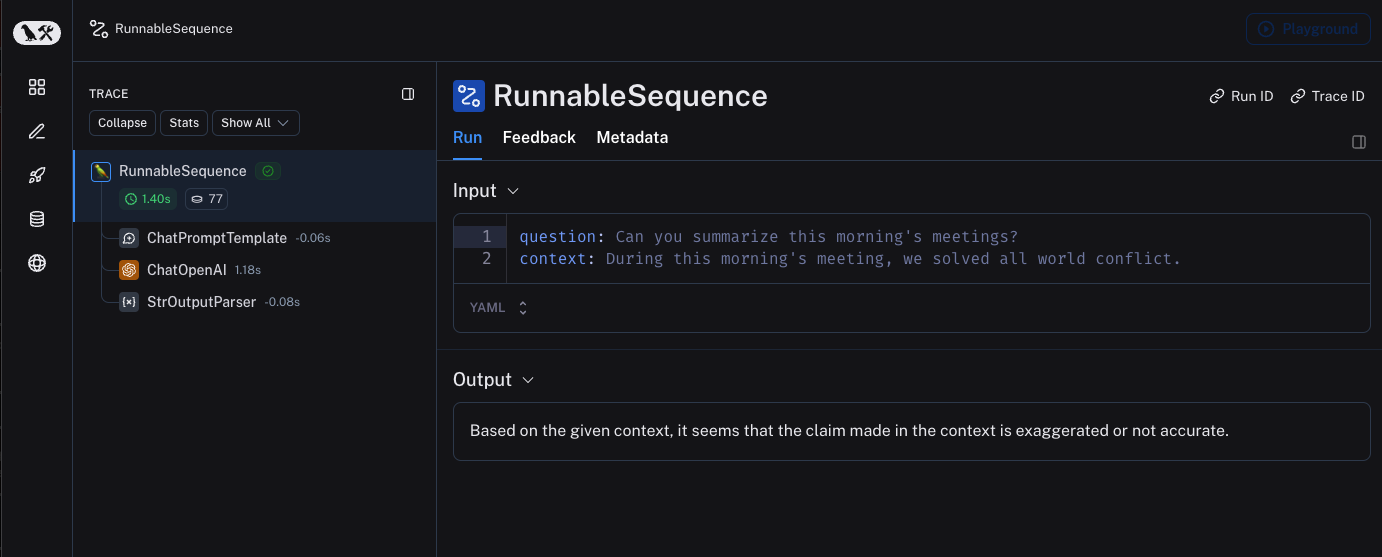
无需额外编写代码即可将追踪信息记录到 LangSmith。只需像往常一样运行您的 LangChain 代码即可。
- Python
- TypeScript
from langchain_openai import ChatOpenAI
from langchain_core.prompts import ChatPromptTemplate
from langchain_core.output_parsers import StrOutputParser

prompt = ChatPromptTemplate.from_messages([
    ("system", "You are a helpful assistant. Please respond to the user's request only based on the given context."),
    ("user", "Question: {question}\nContext: {context}")
])
model = ChatOpenAI(model="gpt-4o-mini")
output_parser = StrOutputParser()

chain = prompt | model | output_parser

question = "Can you summarize this morning's meetings?"
context = "During this morning's meeting, we solved all world conflict."
chain.invoke({"question": question, "context": context})
import { ChatOpenAI } from "@langchain/openai";
import { ChatPromptTemplate } from "@langchain/core/prompts";
import { StringOutputParser } from "@langchain/core/output_parsers";

const prompt = ChatPromptTemplate.fromMessages([
  ["system", "You are a helpful assistant. Please respond to the user's request only based on the given context."],
  ["user", "Question: {question}\nContext: {context}"],
]);
const model = new ChatOpenAI({ modelName: "gpt-4o-mini" });
const outputParser = new StringOutputParser();

const chain = prompt.pipe(model).pipe(outputParser);

const question = "Can you summarize this morning's meetings?"
const context = "During this morning's meeting, we solved all world conflict."
await chain.invoke({ question: question, context: context });
3. 查看您的追踪记录
默认情况下,追踪信息将记录到名称为 default 的项目中。使用上述代码记录的追踪示例已公开,可在此处查看 此处。
选择性追踪
上一节介绍了如何通过设置单个环境变量,来追踪应用程序中所有 LangChain 可运行组件(runnables)的调用。虽然这是一种便捷的入门方式,但您可能仅希望追踪特定的调用或应用程序的某些部分。
在 Python 中有两种实现方式:一种是手动传入一个 LangChainTracer(参考文档)实例作为回调函数,另一种是使用 tracing_v2_enabled 上下文管理器(参考文档)。
在 JavaScript/TypeScript 中,您可以将一个 LangChainTracer(参考文档)实例作为回调函数传入。
- Python
- TypeScript
# You can configure a LangChainTracer instance to trace a specific invocation.
from langchain.callbacks.tracers import LangChainTracer

tracer = LangChainTracer()
chain.invoke({"question": "Am I using a callback?", "context": "I'm using a callback"}, config={"callbacks": [tracer]})

# LangChain Python also supports a context manager for tracing a specific block of code.
from langchain_core.tracers.context import tracing_v2_enabled
with tracing_v2_enabled():
  chain.invoke({"question": "Am I using a context manager?", "context": "I'm using a context manager"})

# This will NOT be traced (assuming LANGSMITH_TRACING is not set)
chain.invoke({"question": "Am I being traced?", "context": "I'm not being traced"})
// You can configure a LangChainTracer instance to trace a specific invocation.
import { LangChainTracer } from "@langchain/core/tracers/tracer_langchain";

const tracer = new LangChainTracer();
await chain.invoke(
{
  question: "Am I using a callback?",
  context: "I'm using a callback"
},
{ callbacks: [tracer] }
);
记录到特定项目
静态地
如追踪概念指南中所述,LangSmith 使用“项目(Project)”这一概念来对追踪记录进行分组。如果未明确指定,追踪器的项目将默认设置为“default”。您可以通过设置 LANGSMITH_PROJECT 环境变量,为整个应用程序运行配置自定义的项目名称。此操作应在运行应用程序之前完成。
export LANGSMITH_PROJECT=my-project
LANGSMITH_PROJECT 标志仅在 JS SDK 版本 >= 0.2.16 中受支持,如果您使用的是旧版本,请改用 LANGCHAIN_PROJECT。
动态
本部分主要基于上一节,允许您为特定的 LangChainTracer 实例设置项目名称,或将其作为参数传递给 Python 中的 tracing_v2_enabled 上下文管理器。
- Python
- TypeScript
# You can set the project name for a specific tracer instance:
from langchain.callbacks.tracers import LangChainTracer

tracer = LangChainTracer(project_name="My Project")
chain.invoke({"question": "Am I using a callback?", "context": "I'm using a callback"}, config={"callbacks": [tracer]})

# You can set the project name using the project_name parameter.
from langchain_core.tracers.context import tracing_v2_enabled
with tracing_v2_enabled(project_name="My Project"):
  chain.invoke({"question": "Am I using a context manager?", "context": "I'm using a context manager"})
// You can set the project name for a specific tracer instance:
import { LangChainTracer } from "@langchain/core/tracers/tracer_langchain";

const tracer = new LangChainTracer({ projectName: "My Project" });
await chain.invoke(
{
  question: "Am I using a callback?",
  context: "I'm using a callback"
},
{ callbacks: [tracer] }
);
为追踪添加元数据和标签
您可以通过在配置(Config)中提供任意元数据和标签来为追踪记录添加注释。 这有助于将额外信息(例如执行该追踪记录的环境或发起该追踪记录的用户)与追踪记录相关联。 有关如何根据元数据和标签查询追踪记录及运行实例的信息,请参阅本指南。
当您通过 RunnableConfig 或在运行时通过调用参数为可运行对象(runnable)附加元数据或标签时,这些元数据或标签将被该可运行对象的所有子可运行对象继承。
- Python
- TypeScript
from langchain_openai import ChatOpenAI
from langchain_core.prompts import ChatPromptTemplate
from langchain_core.output_parsers import StrOutputParser

prompt = ChatPromptTemplate.from_messages([
("system", "You are a helpful AI."),
("user", "{input}")
])
# The tag "model-tag" and metadata {"model-key": "model-value"} will be attached to the ChatOpenAI run only
chat_model = ChatOpenAI().with_config({"tags": ["model-tag"], "metadata": {"model-key": "model-value"}})
output_parser = StrOutputParser()

# Tags and metadata can be configured with RunnableConfig
chain = (prompt | chat_model | output_parser).with_config({"tags": ["config-tag"], "metadata": {"config-key": "config-value"}})

# Tags and metadata can also be passed at runtime
chain.invoke({"input": "What is the meaning of life?"}, {"tags": ["invoke-tag"], "metadata": {"invoke-key": "invoke-value"}})
import { ChatOpenAI } from "@langchain/openai";
import { ChatPromptTemplate } from "@langchain/core/prompts";
import { StringOutputParser } from "@langchain/core/output_parsers";

const prompt = ChatPromptTemplate.fromMessages([
["system", "You are a helpful AI."],
["user", "{input}"]
])
// The tag "model-tag" and metadata {"model-key": "model-value"} will be attached to the ChatOpenAI run only
const model = new ChatOpenAI().withConfig({ tags: ["model-tag"], metadata: { "model-key": "model-value" } });
const outputParser = new StringOutputParser();

// Tags and metadata can be configured with RunnableConfig
const chain = (prompt.pipe(model).pipe(outputParser)).withConfig({"tags": ["config-tag"], "metadata": {"config-key": "top-level-value"}});

// Tags and metadata can also be passed at runtime
await chain.invoke({input: "What is the meaning of life?"}, {tags: ["invoke-tag"], metadata: {"invoke-key": "invoke-value"}})
自定义运行名称
您可以在调用或流式传输 LangChain 代码时,通过在 配置(Config) 中指定名称来自定义某次运行的名称。
该名称用于在 LangSmith 中标识此次运行,并可用于筛选和分组运行记录。同时,该名称也会作为此次运行在 LangSmith 用户界面中的标题显示。
您可以通过在构造时向 run_name 对象中设置 RunnableConfig,或在 JavaScript/TypeScript 的调用参数中传入 run_name 来实现此功能。
此功能目前不直接支持 LLM 对象。
- Python
- TypeScript
# When tracing within LangChain, run names default to the class name of the traced object (e.g., 'ChatOpenAI').
configured_chain = chain.with_config({"run_name": "MyCustomChain"})
configured_chain.invoke({"input": "What is the meaning of life?"})

# You can also configure the run name at invocation time, like below
chain.invoke({"input": "What is the meaning of life?"}, {"run_name": "MyCustomChain"})
// When tracing within LangChain, run names default to the class name of the traced object (e.g., 'ChatOpenAI').
const configuredChain = chain.withConfig({ runName: "MyCustomChain" });
await configuredChain.invoke({ input: "What is the meaning of life?" });

// You can also configure the run name at invocation time, like below
await chain.invoke({ input: "What is the meaning of life?" }, {runName: "MyCustomChain"})
自定义运行ID
您可以在调用或流式传输 LangChain 代码时,通过在 配置(Config) 中指定,来自定义某次运行的 ID。
该 ID 用于在 LangSmith 中唯一标识此次运行,可用于查询特定的运行记录。ID 在跨不同系统关联运行记录,或实现自定义追踪逻辑时尤为有用。
您可以通过在构造时向 run_id 对象中设置 RunnableConfig,或在 JavaScript/TypeScript 的调用参数中传入 run_id 来实现此功能。
此功能目前不直接支持 LLM 对象。
- Python
- TypeScript
import uuid

my_uuid = uuid.uuid4()
# You can configure the run ID at invocation time:
chain.invoke({"input": "What is the meaning of life?"}, {"run_id": my_uuid})
import { v4 as uuidv4 } from 'uuid';

const myUuid = uuidv4();

// You can configure the run ID at invocation time, like below
await chain.invoke({ input: "What is the meaning of life?" }, { runId: myUuid });
请注意,如果在追踪的根节点(即顶层运行)执行此操作,则该运行 ID 将被用作trace_id。
访问 LangChain 调用的运行(span)ID
调用 LangChain 对象时,您可以获取该调用的运行 ID(run ID)。此运行 ID 可用于在 LangSmith 中查询对应的运行记录。
在 Python 中,您可以使用 collect_runs 上下文管理器来访问运行 ID。
在 JavaScript/TypeScript 中,您可以使用 RunCollectorCallbackHandler 实例来访问运行 ID。
- Python
- TypeScript
from langchain_openai import ChatOpenAI
from langchain_core.prompts import ChatPromptTemplate
from langchain_core.output_parsers import StrOutputParser
from langchain_core.tracers.context import collect_runs

prompt = ChatPromptTemplate.from_messages([
  ("system", "You are a helpful assistant. Please respond to the user's request only based on the given context."),
  ("user", "Question: {question}\n\nContext: {context}")
])
model = ChatOpenAI(model="gpt-4o-mini")
output_parser = StrOutputParser()

chain = prompt | model | output_parser

question = "Can you summarize this morning's meetings?"
context = "During this morning's meeting, we solved all world conflict."
with collect_runs() as cb:
result = chain.invoke({"question": question, "context": context})
# Get the root run id
run_id = cb.traced_runs[0].id
print(run_id)
import { ChatOpenAI } from "@langchain/openai";
import { ChatPromptTemplate } from "@langchain/core/prompts";
import { StringOutputParser } from "@langchain/core/output_parsers";
import { RunCollectorCallbackHandler } from "@langchain/core/tracers/run_collector";

const prompt = ChatPromptTemplate.fromMessages([
["system", "You are a helpful assistant. Please respond to the user's request only based on the given context."],
["user", "Question: {question\n\nContext: {context}"],
]);
const model = new ChatOpenAI({ modelName: "gpt-4o-mini" });
const outputParser = new StringOutputParser();

const chain = prompt.pipe(model).pipe(outputParser);
const runCollector = new RunCollectorCallbackHandler();

const question = "Can you summarize this morning's meetings?"
const context = "During this morning's meeting, we solved all world conflict."
await chain.invoke(
  { question: question, context: context },
  { callbacks: [runCollector] }
);
const runId = runCollector.tracedRuns[0].id;
console.log(runId);
确保在退出前提交所有痕迹
在 LangChain Python 中,LangSmith 的追踪功能在后台线程中执行,以避免阻塞您的生产应用。这意味着,在所有追踪数据成功发送至 LangSmith 之前,您的进程可能就已经结束。这种情况在无服务器(serverless)环境中尤为常见,因为一旦您的链(chain)或智能体(agent)执行完成,您的虚拟机(VM)可能会立即被终止。
您可以通过将 LANGCHAIN_CALLBACKS_BACKGROUND 环境变量设置为 "false" 来使回调同步执行。
对于这两种语言,LangChain 均提供了方法,可在退出应用程序前等待追踪数据提交完成。 以下是一个示例:
- Python
- TypeScript
from langchain_openai import ChatOpenAI
from langchain_core.tracers.langchain import wait_for_all_tracers

llm = ChatOpenAI()
try:
  llm.invoke("Hello, World!")
finally:
  wait_for_all_tracers()
import { ChatOpenAI } from "@langchain/openai";
import { awaitAllCallbacks } from "@langchain/core/callbacks/promises";

try {
const llm = new ChatOpenAI();
const response = await llm.invoke("Hello, World!");
} catch (e) {
// handle error
} finally {
await awaitAllCallbacks();
}
未设置环境变量的追踪
如其他指南中所述,以下环境变量可用于配置是否启用追踪、API 端点、API 密钥以及追踪项目:
LANGSMITH_TRACINGLANGSMITH_API_KEYLANGSMITH_ENDPOINTLANGSMITH_PROJECT
然而,在某些环境中,无法设置环境变量。在这种情况下,您可以通过编程方式设置跟踪配置。
本节内容主要基于上一节。
- Python
- TypeScript
from langchain.callbacks.tracers import LangChainTracer
from langsmith import Client

# You can create a client instance with an api key and api url
client = Client(
  api_key="YOUR_API_KEY",  # This can be retrieved from a secrets manager
  api_url="https://api.smith.langchain.com",  # Update appropriately for self-hosted installations or the EU region
)

# You can pass the client and project_name to the LangChainTracer instance
tracer = LangChainTracer(client=client, project_name="test-no-env")
chain.invoke({"question": "Am I using a callback?", "context": "I'm using a callback"}, config={"callbacks": [tracer]})

# LangChain Python also supports a context manager which allows passing the client and project_name
from langchain_core.tracers.context import tracing_v2_enabled
with tracing_v2_enabled(client=client, project_name="test-no-env"):
  chain.invoke({"question": "Am I using a context manager?", "context": "I'm using a context manager"})
import { LangChainTracer } from "@langchain/core/tracers/tracer_langchain";
import { Client } from "langsmith";

// You can create a client instance with an api key and api url
const client = new Client(
  {
      apiKey: "YOUR_API_KEY",
      apiUrl: "https://api.smith.langchain.com", // Update appropriately for self-hosted installations or the EU region
  }
);

// You can pass the client and project_name to the LangChainTracer instance
const tracer = new LangChainTracer({client, projectName: "test-no-env"});
await chain.invoke(
{
  question: "Am I using a callback?",
  context: "I'm using a callback",
},
{ callbacks: [tracer] }
);
使用 LangChain 实现分布式追踪(Python)
LangSmith 支持与 LangChain Python 的分布式追踪功能。这使您能够跨不同服务和应用程序关联各次运行(即“跨度”)。 其原理与 LangSmith SDK 分布式追踪指南 类似。
import langsmith
from langchain_core.runnables import chain
from langsmith.run_helpers import get_current_run_tree

# -- This code should be in a separate file or service --
@chain
def child_chain(inputs):
    return inputs["test"] + 1

def child_wrapper(x, headers):
    with langsmith.tracing_context(parent=headers):
        child_chain.invoke({"test": x})

# -- This code should be in a separate file or service --
@chain
def parent_chain(inputs):

    rt = get_current_run_tree()
    headers = rt.to_headers()
    # ... make a request to another service with the headers
    # The headers should be passed to the other service, eventually to the child_wrapper function

parent_chain.invoke({"test": 1})
LangChain(Python)与LangSmith SDK之间的互操作性
如果您在应用程序的某一部分使用 LangChain,而在其他部分使用 LangSmith SDK(参见本指南),您仍然可以无缝地追踪整个应用程序。
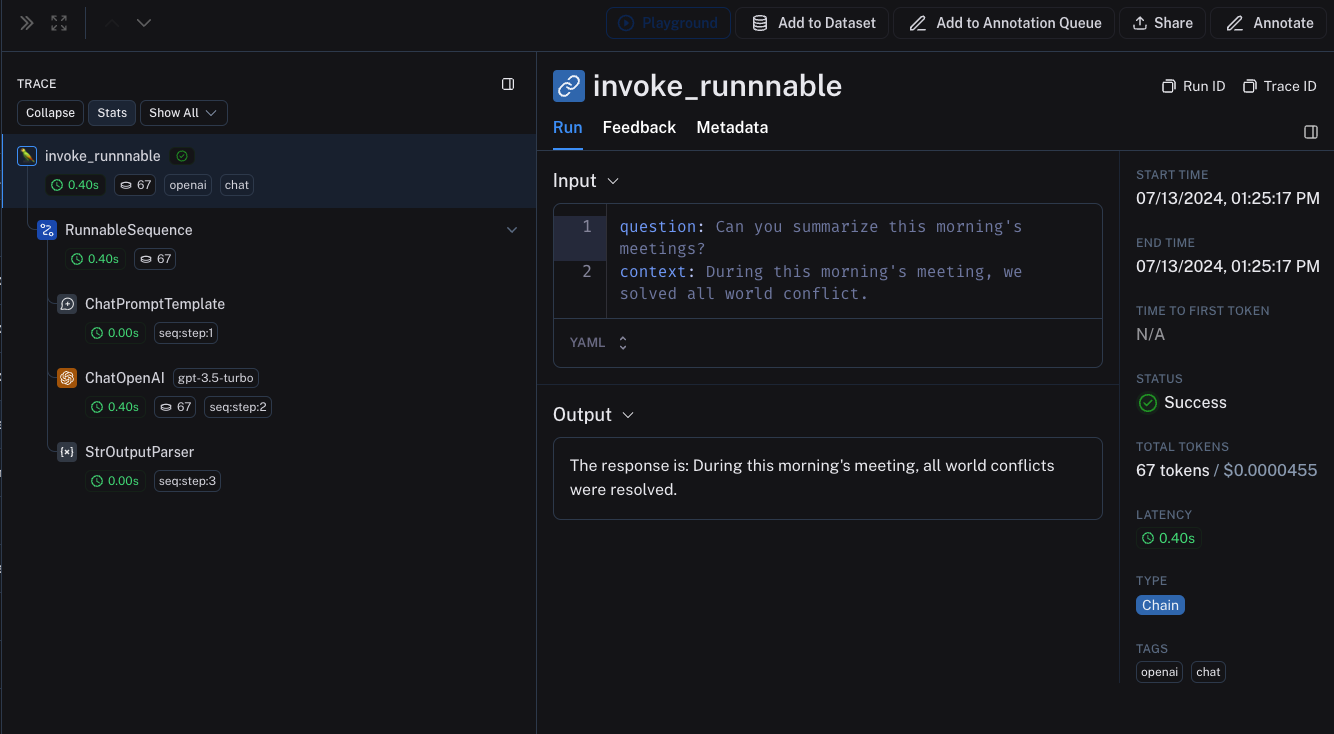
当在 traceable 函数内调用 LangChain 对象时,这些对象将被追踪,并作为 traceable 函数的子运行(child run)进行绑定。
from langchain_openai import ChatOpenAI
from langchain_core.prompts import ChatPromptTemplate
from langchain_core.output_parsers import StrOutputParser

from langsmith import traceable

prompt = ChatPromptTemplate.from_messages([
    ("system", "You are a helpful assistant. Please respond to the user's request only based on the given context."),
    ("user", "Question: {question}\nContext: {context}")
])
model = ChatOpenAI(model="gpt-4o-mini")
output_parser = StrOutputParser()

chain = prompt | model | output_parser

# The above chain will be traced as a child run of the traceable function
@traceable(
    tags=["openai", "chat"],
    metadata={"foo": "bar"}
)
def invoke_runnnable(question, context):
    result = chain.invoke({"question": question, "context": context})
    return "The response is: " + result

invoke_runnnable("Can you summarize this morning's meetings?", "During this morning's meeting, we solved all world conflict.")
这将生成以下跟踪树:
LangChain.JS 与 LangSmith SDK 之间的互操作性
在 traceable 内追踪 LangChain 对象(仅限 JavaScript)
从 langchain@0.2.x 开始,当 LangChain 对象在 @traceable 函数内使用时,系统会自动对其进行追踪,并继承该可追踪函数的客户端、标签、元数据和项目名称。
对于低于 0.2.x 版本的旧版 LangChain,您需要手动传入一个从 @traceable 中的追踪上下文创建的 LangChainTracer 实例。
import { ChatOpenAI } from "@langchain/openai";
import { ChatPromptTemplate } from "@langchain/core/prompts";
import { StringOutputParser } from "@langchain/core/output_parsers";
import { getLangchainCallbacks } from "langsmith/langchain";

const prompt = ChatPromptTemplate.fromMessages([
  [
    "system",
    "You are a helpful assistant. Please respond to the user's request only based on the given context.",
  ],
  ["user", "Question: {question}\nContext: {context}"],
]);
const model = new ChatOpenAI({ modelName: "gpt-4o-mini" });
const outputParser = new StringOutputParser();

const chain = prompt.pipe(model).pipe(outputParser);

const main = traceable(
  async (input: { question: string; context: string }) => {
    const callbacks = await getLangchainCallbacks();
    const response = await chain.invoke(input, { callbacks });
    return response;
  },
  { name: "main" }
);
通过 traceable / RunTree API 追踪 LangChain 子运行(仅 JavaScript)
我们正在改进 traceable 与 LangChain 之间的互操作性。当前将 LangChain 与 traceable 结合使用时存在以下限制:
- 对从 RunnableLambda 上下文的
getCurrentRunTree()获取的 RunTree 进行修改操作将不会产生任何效果。 - 不建议通过
getCurrentRunTree()遍历由 RunnableLambda 获取的 RunTree,因为它可能不包含全部的 RunTree 节点。 - 不同的子运行可能具有相同的
execution_order和child_execution_order值。因此,在极端情况下,某些运行的顺序可能会因start_time而不同。
在某些使用场景中,您可能希望在 RunnableSequence 中运行 traceable 函数,或通过 RunTree API 以命令式方式追踪 LangChain 运行的子运行。自 LangSmith 0.1.39 和 @langchain/core 0.2.18 起,您可直接在 RunnableLambda 中调用经 traceable 封装的函数。
import { traceable } from "langsmith/traceable";
import { RunnableLambda } from "@langchain/core/runnables";
import { RunnableConfig } from "@langchain/core/runnables";

const tracedChild = traceable((input: string) => `Child Run: ${input}`, {
  name: "Child Run",
});

const parrot = new RunnableLambda({
  func: async (input: { text: string }, config?: RunnableConfig) => {
    return await tracedChild(input.text);
  },
});
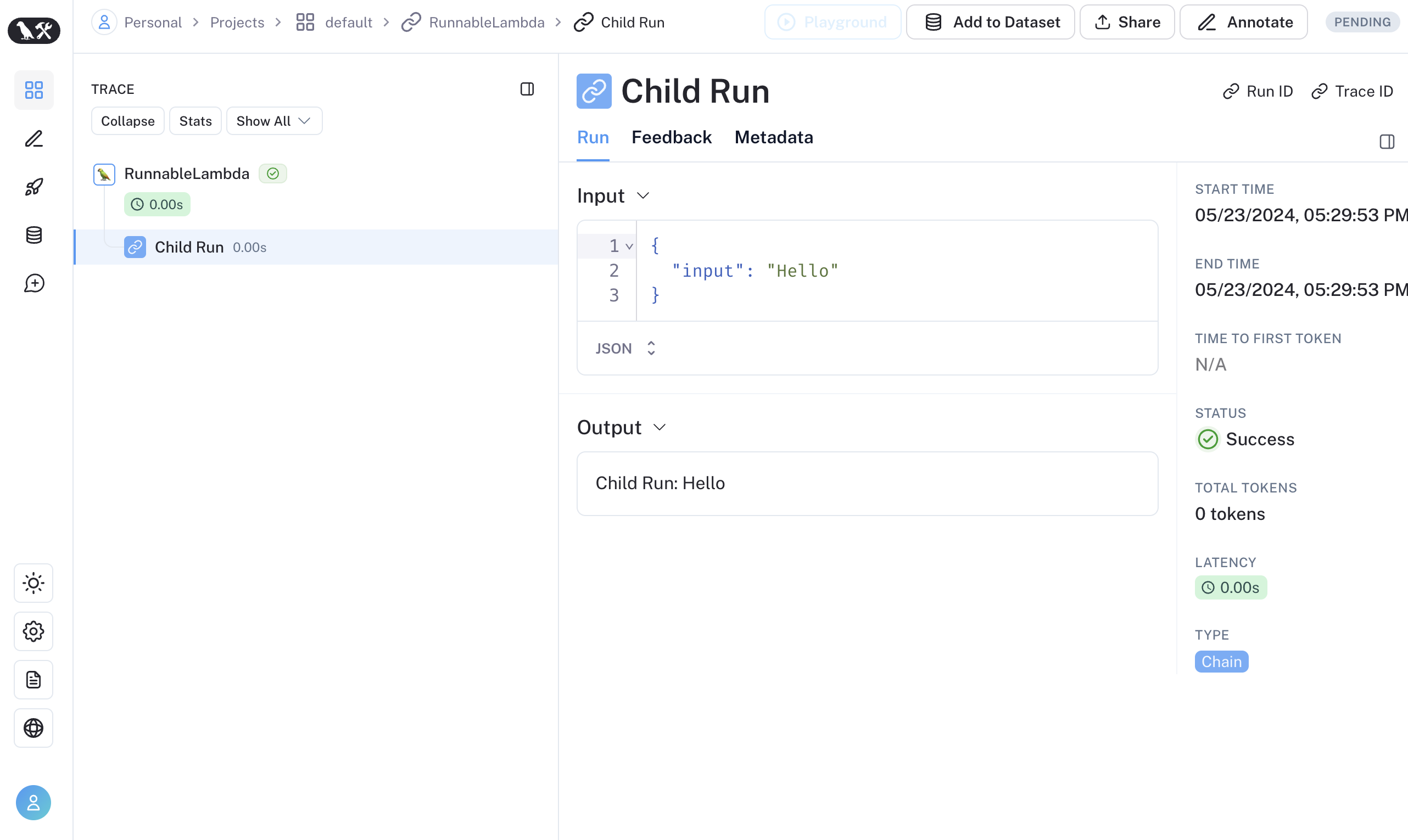
或者,您可以通过使用 RunTree.fromRunnableConfig 将 LangChain 的 RunnableConfig 转换为等效的 RunTree 对象,也可以将 RunnableConfig 作为 traceable 包装函数的第一个参数传入。
- 可追溯的
- 运行树
import { traceable } from "langsmith/traceable";
import { RunnableLambda } from "@langchain/core/runnables";
import { RunnableConfig } from "@langchain/core/runnables";

const tracedChild = traceable((input: string) => `Child Run: ${input}`, {
  name: "Child Run",
});

const parrot = new RunnableLambda({
  func: async (input: { text: string }, config?: RunnableConfig) => {
    // Pass the config to existing traceable function
    await tracedChild(config, input.text);
    return input.text;
  },
});
import { RunTree } from "langsmith/run_trees";
import { RunnableLambda } from "@langchain/core/runnables";
import { RunnableConfig } from "@langchain/core/runnables";

const parrot = new RunnableLambda({
  func: async (input: { text: string }, config?: RunnableConfig) => {
    // create the RunTree from the RunnableConfig of the RunnableLambda
    const childRunTree = RunTree.fromRunnableConfig(config, {
      name: "Child Run",
    });

    childRunTree.inputs = { input: input.text };
    await childRunTree.postRun();

    childRunTree.outputs = { output: `Child Run: ${input.text}` };
    await childRunTree.patchRun();

    return input.text;
  },
});
如果您更喜欢视频教程,请观看《LangSmith 入门课程》中的追踪的其他方法视频。